- How to contact the tutors?
Only VIP Student / Employer
Members can read the contact information
of all the tutors. The VIP Student / Employer
Membership Fee is HK$250 / 2 months.
For those who want to find language tutors
may contact the featured tutors listing on
our website directly, whom's contact information
can be found on our website. To prevent spam,
their e-mail addresses will be shown as pictures.
Please copy down by hand.
Or you may place job advertisement on our
website, each job ad: HK$150 / month. And
let the protential tutors to contact you directly.
«
Back to top
- Is it free to
post advertisement in this website?
For tutor, it is free to post advertisement
in our website.
If tutor want to place the advertisement with "Priority Listing", the total cost
is HK$80/15 days, HK$110/1 month, HK$170/2 months.
"Priority Listing" means the advertisement will be posted at the priority position. When a tutor consume "Priority Listing", his tutor advertisement will be posted at the top of the first page. If there is another tutor consume "Priority Listing", the new one will be posted at the top of the first page, and the older one will be move downward. Besides, the contact information of their ad will be shown publicly.
If tutor want to have better
exposure rate, he may consider "Banner Advertisement". The details of "Banner Advertisement" can be found on http://www.hklanguagetutor.com/eng/advertisement.php
While for student / parent / employer to
post job advertisement,
each job ad: HK$150 / month.
«
Back to top
- How long will
the advertisement last?
The Tutor Advertisement will last
for 60 days. Tutor can renew the advertisement
at or before expiry date, or it will be hidden. And
the hidden advertisement will be online again
at the time tutor renew it.
The Tutor Advertisement with Priority Listing
will last for 120 days. Tutor can renew the
advertisement at or before expiry date, or
it will be hidden. And the hidden advertisement
will be online again at the time tutor renew
it.
While the duration of Job Advertisement
will last for a month.
«
Back to top
- Can I post the
Ad repeatedly?
Tutor Advertisement can not be posted
repeatedly.
«
Back to top
- Can I edit my
profile at anytime?
Yes, just click Login / Update,
enter the Registration E-mail Address
and Password to complete
the form with update information. Your profile
will be updated later on.
«
Back to top
- How to post
advertisement on the website?
Please click Post Job Ad/
Post Tutor Ad, and complete
the forms.
«
Back to top
- When will the
advertisement posted after the form is sent?
The advertisement will be posted
in 3 working days if the information and
image upload is accepted.
«
Back to top
- Do you work
as agency and introduce private tutor for
me?
Sorry, we do not work as agent at
the moment.
«
Back to top
- What is online
tutoring?
Online tutoring means tutoring take
place via internet.
There are 3 kinds of online tutoring.
One of them is by e-mail. Tutors can use e-mail
to correct the compositions of students or
answer questions.
The second one is video/ audio conference.
Tutors and students can make real time online
video/ audio conference through free video/
audio conference softwares such as msn
windows messenger and skype
(notice: some special functions of these softwares
are not free). Some companies may develop
their own video/ audio conference programs.
Some may provide the video/ audio conference
records for students' revision.
The third one is self-learning online. Usually,
the website will provide phonetic information,
words database and articles, exercises, CD,
VCD etc. Some websites will provide test online.
«
Back to top
- How to make
video/ audio conference?
Before taking video/ audio conference,
please make sure the computer has Broadband
Internet Connection, Web Camera, Computer
microphone and speakers or headset with microphone,
download and install video/ audio conference
software such as msn
windows messenger and skype
(notice: some special functions of these softwares
are not free). Then open the software and
open an account, and add the contact.
«
Back to top
- What is Paypal?
Paypal
is an online payment system, which is commonly
used for international transaction with small
amount remittance. But it may not be available
in some countries. Please visit Paypal
website for more details.
«
Back to top
- How to input
foreign languages in computer?
Step 1 - Install X Language Input
Method:
WIN 2000/XP
Start → Control Panel → Regional and Language
Options → Languages → Details → Add →
Japanese, Microsoft IME Standard 2002 &
Handwriting recognition/
Korean, Korean Input System (IME 2002) &
Handwriting recognition/
French (Canada), Canadian Multilingual Standard/
Spanish (Mexico), Latin American/
German (Switzerland), Swiss German/
Italian (Italy), Italian/
Russian, Russian/
Chinese (Hong Kong), Microsoft New Phonetic
IME & Handwriting recognition/
Chinese (Hong Kong), Chinese (Traditional)
- US Keyboard & Handwriting recognition/
Chinese (Hong Kong), Chinese (Traditional)
- ChangJie & Handwriting recognition/
Chinese (Hong Kong), Chinese (Traditional)
- Quick & Handwriting recognition
→ Apply → OK
Step 2 - X Language circumstance
setting:
WIN XP
Start → Control Panel → Regional and Language
Options → Advanced →
Japanese/ Korean/ French (Canada)/ Spanish
(Mexico)/ German (Switzerland)/ Italian
(Italy)/ Russian/ Chinese (Hong Kong)
→ Restart
WIN 2000
control panel→regional option→set default→
Japanese/ Korean/ French (Canada)/ Spanish
(Mexico)/ German (Switzerland)/ Italian
(Italy)/ Russian/ Chinese (Hong Kong)
→ Restart
Step 3 - Input X Language:
Japanese
Input Method »
Korean
Input Method »
French
(Canada) Input Method »
Spanish
(Mexico) Input Method »
German
(Switzerland) Input Method »
Chinese
(Hong Kong) Input Method »
«
Back to top
-
What is
Native-speaking English Teacher (NET)
Scheme ?
Since 1997, native-speaking English teachers
(NETs) have been introduced to secondary
schools and in 2002 NETs and English language
teaching assistants (ELTAs) have been introduced
in primary schools.
These schemes aim
to support and strengthen English language
learning and teaching in schools.
For more details, please visit :
Native-speaking English Teacher (NET) Scheme http://www.edb.gov.hk/en/curriculum-development/resource-support/net/index.html
«
Back to top
-
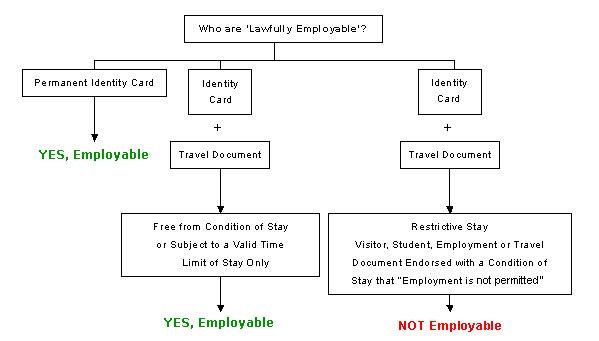
Who are
lawfully employable ?
For more details, please
visit :
Don't Employ Illegal Workers http://www.immd.gov.hk/eng/useful_information/dont-employ-illegal.html
«
Back to top
-
How
to apply employment visa in Hong Kong ?
For more details, please
visit :
Working, Study and other Visa Requirements http://www.gov.hk/en/nonresidents/visarequire/other/
General Employment Policy (GEP) http://www.immd.gov.hk/eng/services/visas/GEP.html
«
Back to top
|